온프레미스 우분투를 활용한 쿠버네티스 구성
온프레미스 우분투를 활용한 쿠버네티스 구성
1. VM 생성
링크 : console.cloud.google.com
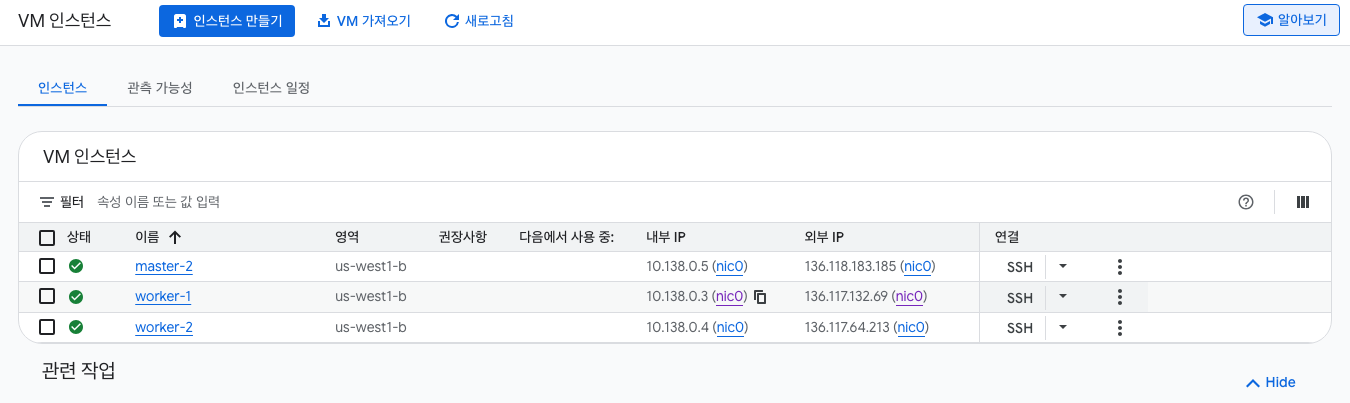
- 스탠다드 모드로 클러스터를 구성
- master 하나 worker 두개
시스템 구성은 모든 VM 아래와 같음 (*이름만 다름)
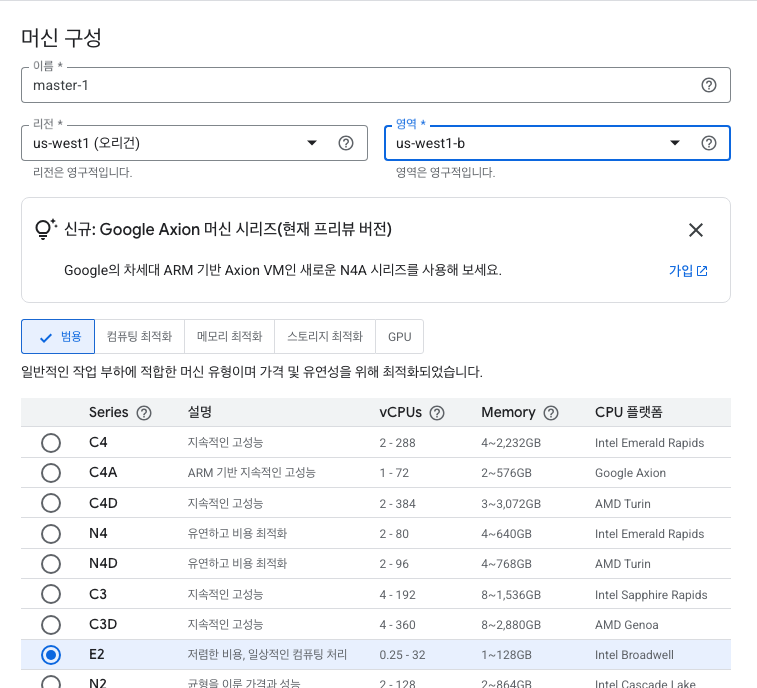

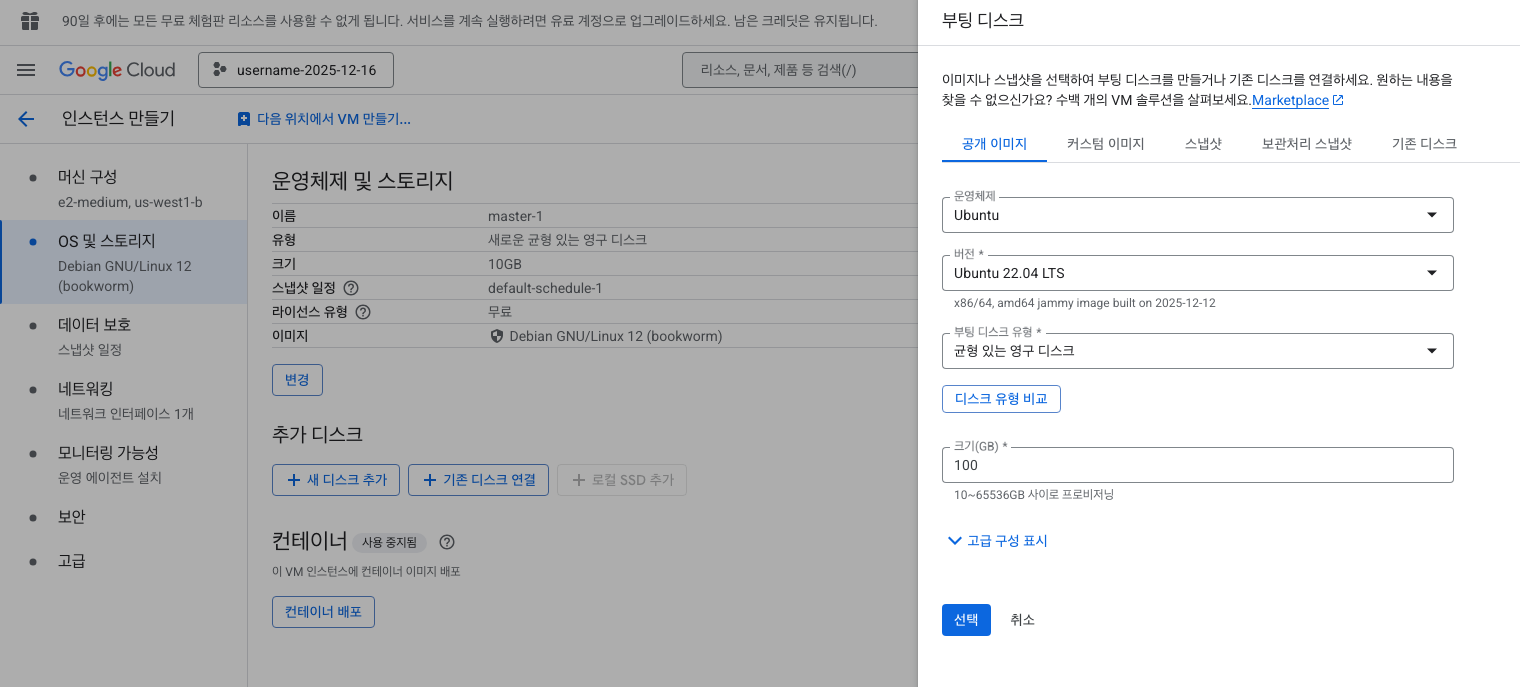
2. 노드 준비
시작 전 조건
- 호환되는 리눅스 머신
- 2GB 이상의 램을 장착한 머신 (이 보다 작으면 사용자의 앱을 위한 공간이 거의 남지 않음)
- 2 이상의 CPU
- 클러스터의 모든 머신에 걸친 전체 네트워크 연결
- 모든 노드에 대해 고유한 호스트 이름
- 컴퓨터의 특정 포트들 개방
- 스왑의 비활성화 (kubelet이 제대로 작동하게 하려면 반드시 스왑을 사용하지 않도록 설정)
How do I disable swap?
I have some sensitive data in RAM that I prefer not to be on disk. How do I disable swap? I have more than enough RAM. If RAM consumption gets too high I have no problems with processes being term...
askubuntu.com
sudo swapoff -a # 현재 시스템에 적용(리부팅하면 재설정 필요)
sudo sed -i '/ swap / s/^\(.*\)$/#\1/g' /etc/fstab # 리부팅 필수
컨테이너 런타임 구성
모든 노드에 다음 명령으로 구성을 수행한다.
https://www.itzgeek.com/how-tos/linux/ubuntu-how-tos/install-containerd-on-ubuntu-22-04.html
How to Install Containerd on Ubuntu 22.04 / Ubuntu 20.04 | ITzGeek
containerd is an industry-standard container runtime that manages the complete container lifecycle of its host system. It handles image
www.itzgeek.com
# Using Docker Repository
sudo apt update
sudo apt install -y ca-certificates curl gnupg lsb-release
curl -fsSL https://download.docker.com/linux/ubuntu/gpg | sudo gpg --dearmor -o /usr/share/keyrings/docker-archive-keyring.gpg
echo "deb [arch=$(dpkg --print-architecture) signed-by=/usr/share/keyrings/docker-archive-keyring.gpg] https://download.docker.com/linux/ubuntu $(lsb_release -cs) stable" | sudo tee /etc/apt/sources.list.d/docker.list

# containerd 설치
sudo apt update
sudo apt install -y containerd.io
# sudo systemctl status containerd # Ctrl + C를 눌러서 나간다.

# Containerd configuration for Kubernetes
cat <<EOF | sudo tee -a /etc/containerd/config.toml
[plugins."io.containerd.grpc.v1.cri".containerd.runtimes.runc]
[plugins."io.containerd.grpc.v1.cri".containerd.runtimes.runc.options]
SystemdCgroup = true
EOF

sudo sed -i 's/^disabled_plugins \=/\#disabled_plugins \=/g' /etc/containerd/config.toml
sudo systemctl restart containerd

# 소켓이 있는지 확인한다.
ls /var/run/containerd/containerd.sock
kubeadm, kubelet 및 kubectl 설치
모든 머신에 다음 패키지들을 설치합니다.
- kubeadm : 클러스트를 부트스트랩하는 명령이다. 클러스터를 초기화하고 관리하는 기능을 갖는다.
- kubelet : 클러스터의 모든 머신에서 실행되는 파드와 컨테이너 시작과 같은 작업을 수행하는 컴포넌트이다. 데몬으로 동작하며 컨테이너를 관리한다.
- kubectl : 클러스터와 통신하기 위한 커맨드 라인 유틸리티이다. 클라이언트 전용 프로그램이다.
모든 노드에서 다음 명령을 실행합니다.
cat <<EOF > kube_install.sh
# 1. apt 패키지 색인을 업데이트하고, 쿠버네티스 apt 리포지터리를 사용하는 데 필요한 패키지를 설치한다.
sudo apt-get update
sudo apt-get install -y apt-transport-https ca-certificates curl

# 2. 구글 클라우드의 공개 사이닝 키를 다운로드 한다.
sudo curl -fsSLo /usr/share/keyrings/kubernetes-archive-keyring.gpg https://packages.cloud.google.com/apt/doc/apt-key.gpg

# 3. 쿠버네티스 apt 리포지터리를 추가한다.
echo "deb [signed-by=/usr/share/keyrings/kubernetes-archive-keyring.gpg] https://apt.kubernetes.io/ kubernetes-xenial main" | sudo tee /etc/apt/sources.list.d/kubernetes.list

# 4. apt 패키지 색인을 업데이트하고, kubelet, kubeadm, kubectl을 설치하고 해당 버전을 고정한다.
sudo apt-get update
sudo apt-get install -y kubelet kubeadm kubectl
sudo apt-mark hold kubelet kubeadm kubectl
EOF

sudo bash kube_install.sh
kubeadm 버전을 확인
kubeadm version
넷필터 브릿지 설정
모든 노드에 다음 명령으로 넷필터 브릿지 설정
sudo -i
modprobe br_netfilter
echo 1 > /proc/sys/net/ipv4/ip_forward
echo 1 > /proc/sys/net/bridge/bridge-nf-call-iptables
exit- sudo -i 따로 내용 따로 exit 따로 실행할 것
3. 클러스터 구성
여기서부터는 각 노드에서 작업하는 내용이 다르기 때문에 주의가 필요
마스터 노드 초기화
마스터 노드에서 init 작업을 시작합니다.
sudo kubeadm init
이후 다음과 같이 init에 성공합니다. 성공하면 다음과 같이 가이드가 나타납니다.
Your Kubernetes control-plane has initialized successfully!

# 1) 유저 설정
To start using your cluster, you need to run the following as a regular user:

  mkdir -p $HOME/.kube
  sudo cp -i /etc/kubernetes/admin.conf $HOME/.kube/config
  sudo chown $(id -u):$(id -g) $HOME/.kube/config

Alternatively, if you are the root user, you can run:

  export KUBECONFIG=/etc/kubernetes/admin.conf

# 2) 파드 네트워크 설정
You should now deploy a pod network to the cluster.
Run "kubectl apply -f [podnetwork].yaml" with one of the options listed at:
  https://kubernetes.io/docs/concepts/cluster-administration/addons/

# 3) 워커 노드 조인 방법
Then you can join any number of worker nodes by running the following on each as root:

kubeadm join 10.142.0.3:6443 --token xcs79e.vnernooln6yyimtv \
        --discovery-token-ca-cert-hash sha256:c9f8642746515eadc28e72c~
유저 설정
다음 명령을 실행하면 .kube/config 파일이 설정되면서 사용이 가능해집니다. "마스터 노드"에서만 진행
  mkdir -p $HOME/.kube
  sudo cp -i /etc/kubernetes/admin.conf $HOME/.kube/config
  sudo chown $(id -u):$(id -g) $HOME/.kube/config
인증 정보를 사용해 노드 목록을 확인합니다.
$ kubectl get nodes
NAME       STATUS     ROLES           AGE   VERSION
master-1   NotReady   control-plane   5m    v1.26.0
워커 노드 조인
본인의 콘솔에 출력된 토큰과 hash 값을 사용해 조인을 수행해야 합니다. 다음 명령은 "워커 노드"에서 실습을 진행합니다.
sudo kubeadm join 10.142.0.3:6443 --token xcs79e.vnernooln6yyimtv \
        --discovery-token-ca-cert-hash sha256:c9f8642746515eadc28e72c687eface2~
마스터 노드에서 노드 목록을 조회합니다.
$ kubectl get nodes
NAME       STATUS     ROLES           AGE     VERSION
master-1   NotReady   control-plane   7m55s   v1.26.0
worker-1   NotReady   <none>          14s     v1.26.0
worker-2   NotReady   <none>          23s     v1.26.0
*init이나 join을 잘못 수행한 경우
sudo kubeadm reset
*token 재발급 받는 방법 (마스터 노드에서)
토큰 리스트 확인하기 : sudo kubeadm token list
토큰 재발급하기 : sudo kubeadm token create --print-join-command
파드 네트워크 배포
"마스터 노드"에서 다음 명령을 실행하면 앞서 구성한 유저 설정을 통해 클러스터에 cilium을 설치합니다.
cilium 설치
curl -L --fail -o cilium-linux-amd64.tar.gz \
  https://github.com/cilium/cilium-cli/releases/latest/download/cilium-linux-amd64.tar.gz

sudo tar -xzvf cilium-linux-amd64.tar.gz -C /usr/local/bin
rm -f cilium-linux-amd64.tar.gz

cilium version
cilium 설치 전 "클러스터 준비 상태" 확인
kubectl get nodes
kubectl get pods -A
설치
cilium install
cilium status --wait
kubectl get nodes -> ready 로 확인

'쿠버네티스 > 쿠버네티스' 카테고리의 다른 글
| [쿠버네티스 시작] 쿠버네티스 실습 환경 구축(Mac OS) (0) | 2026.03.15 |
|---|---|
| [쿠버네티스 시작] 쿠버네티스 란? (0) | 2026.03.14 |
| Minikube & K9s (모니터링 및 리소스 보기) (0) | 2025.06.08 |
| Minikube & K9s (Kubernetes 네트워크 실습) (1) | 2025.06.07 |
| Minikube & K9s (K9s 구축, 리소스 생성 및 관리 실습, 접근제어 실습) (0) | 2025.06.06 |


댓글